CTD Tally app icon

SOFTWARE BY CTD · iPhone · Apple Watch · Android

Coming soon

CTD Tally: Wireless OBS Tally Light for the Devices Your Crew Already Has

Every camera operator knows the instant they're live — green in preview, red on air — on the iPhone, Android phone, or tablet already mounted on their camera, mirrored to their Apple Watch and the Dynamic Island. No tally hardware, no wiring, no firmware. Scan the OBS WebSocket QR code, pick your angle, and watch the tally flip the moment the director cuts.

iOS 17.0 or later, watchOS 10.0 or later, Android 7.0 or later

Where you'll get it

  • App StoreComing soon
  • Google PlayComing soon
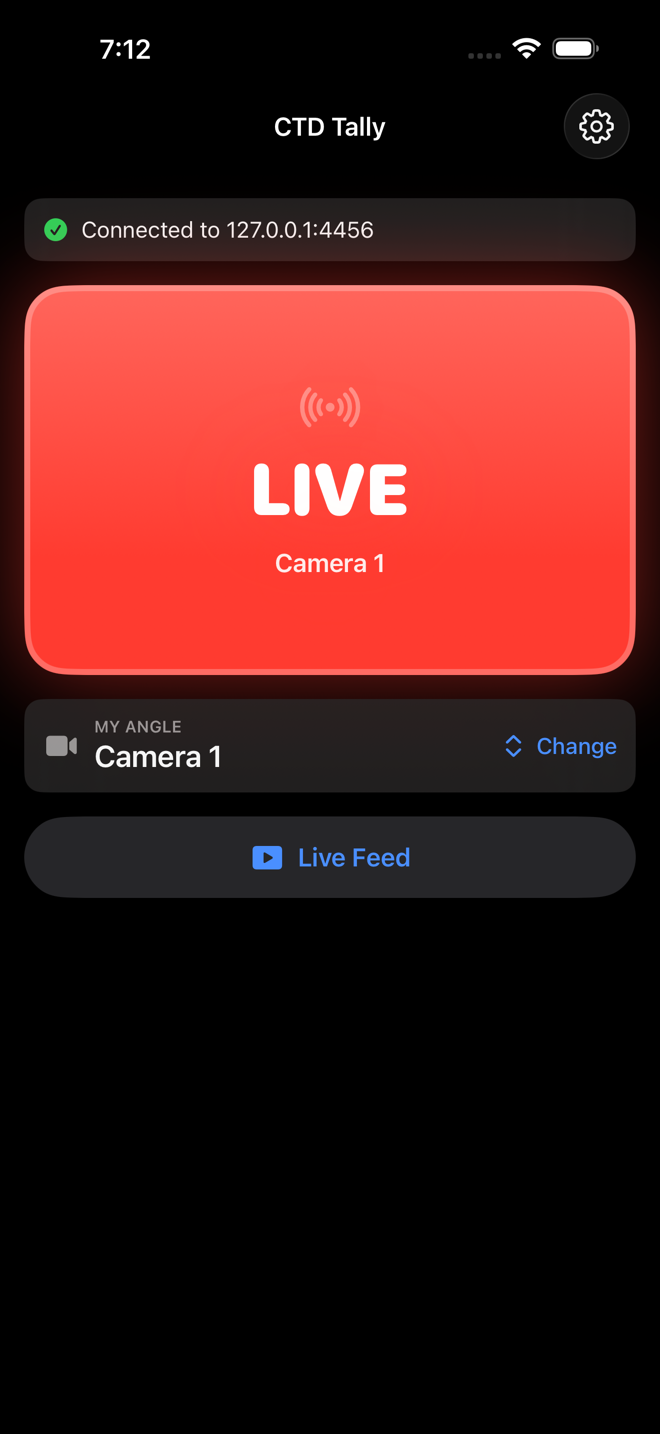
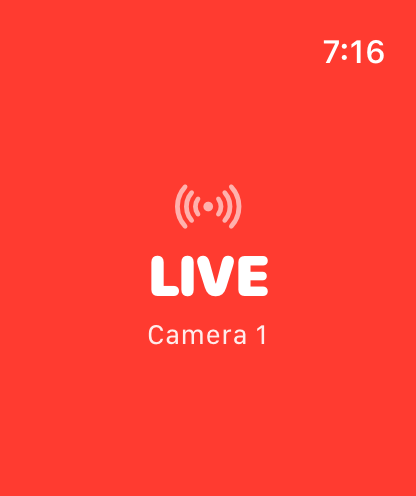
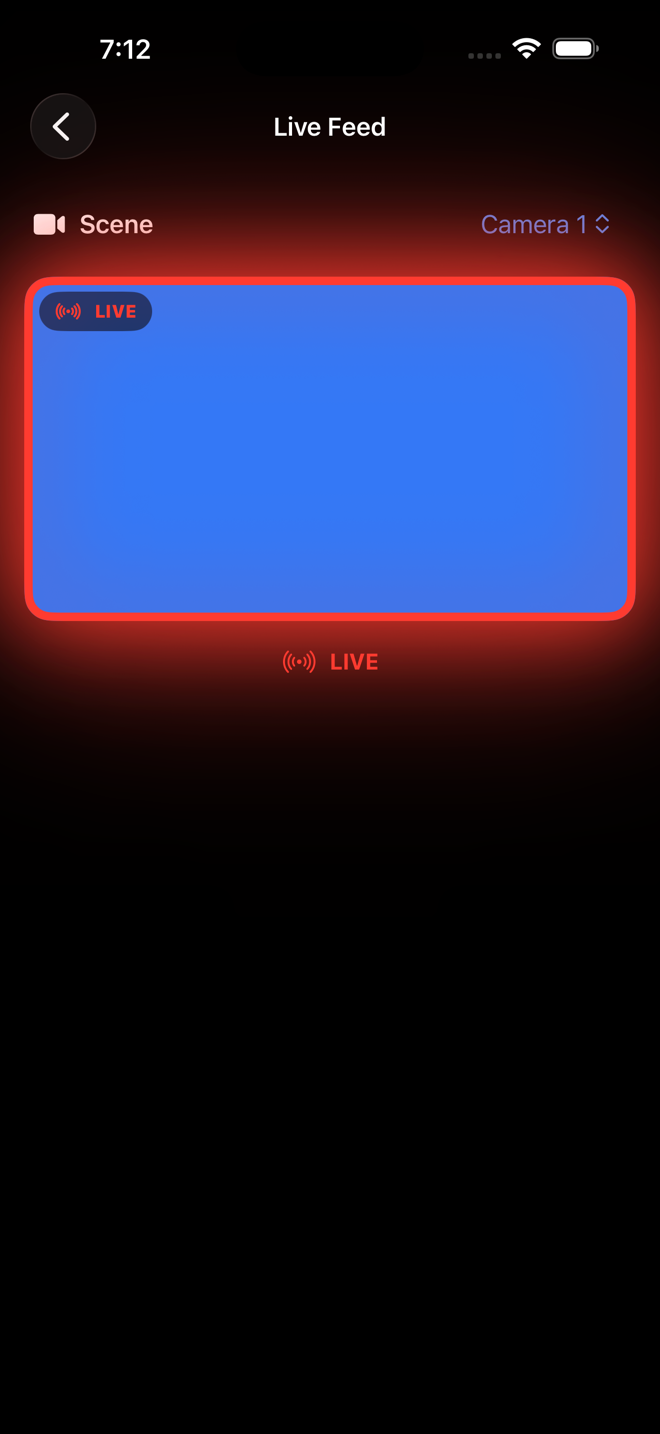
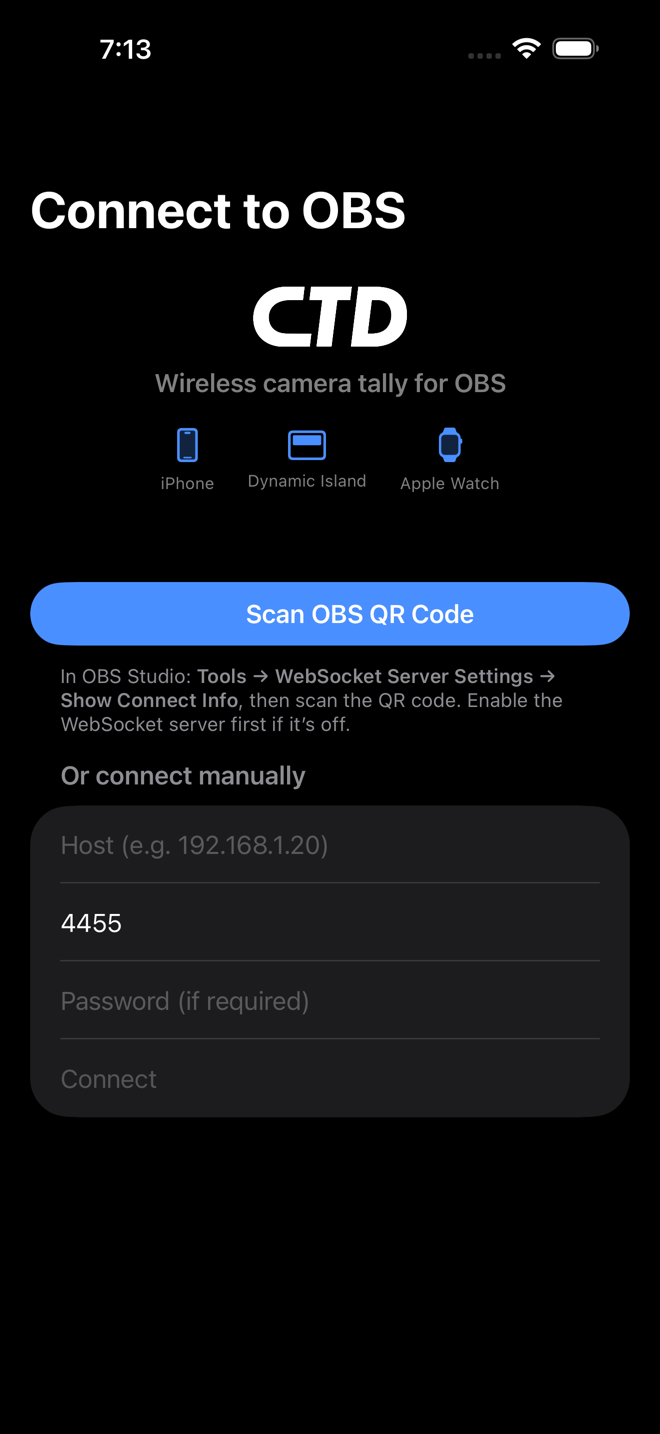
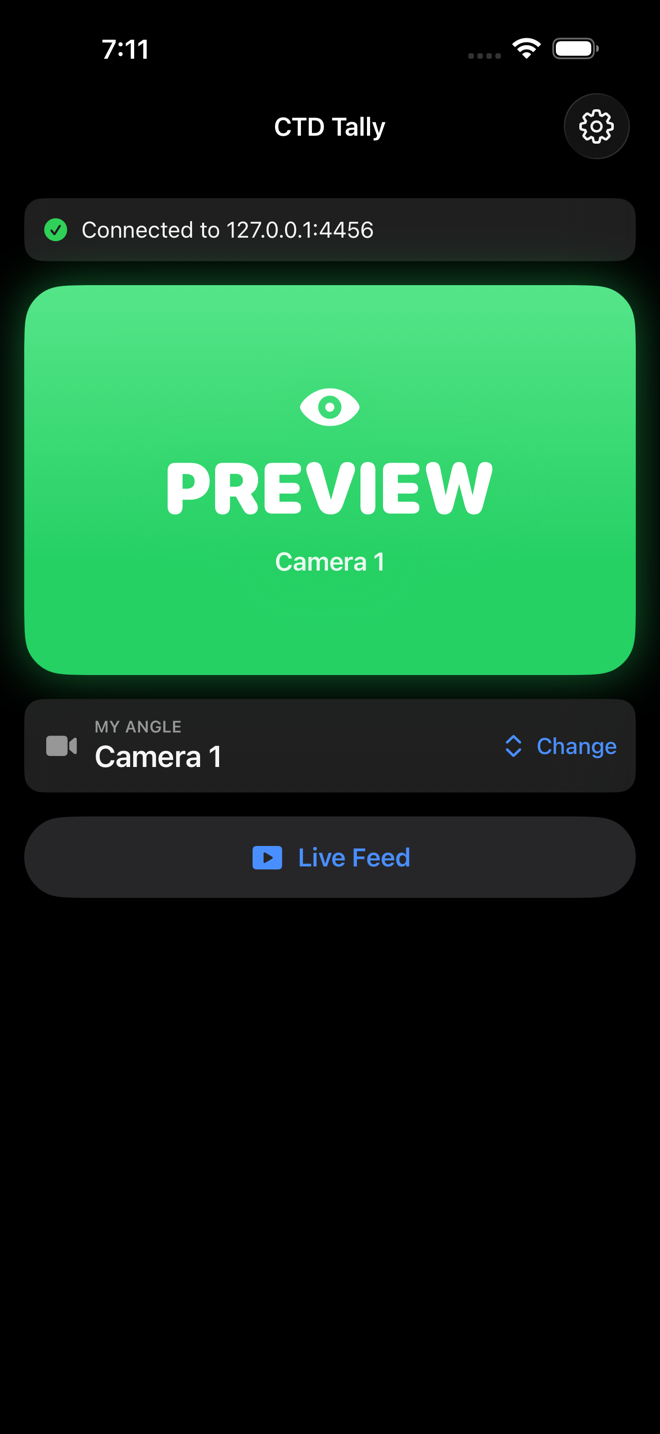
CTD Tally OBS tally light app on iPhone showing a full-screen green PREVIEW state with the scene nameiPhone OBS tally light app showing red LIVE on air, mirrored in the Dynamic Island Live ActivityApple Watch OBS tally light turning the whole watch face red to show the camera is live on programAndroid tablet running CTD Tally as a wireless OBS tally light and confidence monitor mounted on a cameraCTD Tally Live Feed OBS confidence monitor on iPhone showing a scene preview framed by a tally haloCTD Tally connect screen scanning the OBS WebSocket QR code to pair with OBS over the local network

What is an OBS tally light — and why camera operators need one

A tally light is the red/green indicator that tells a camera operator whether their shot is on air (program) or queued up next (preview). OBS Studio has no built-in tally, so most crews either buy wired tally hardware or fly blind. CTD Tally is an OBS tally light app that reads OBS state over obs-websocket and shows a full-screen tally on the phone, tablet, or watch your operators already carry — green PREVIEW, red LIVE, gray STANDBY, with zero guesswork on a multicam shoot.

How CTD Tally works: scan a QR code and pick your angle

CTD Tally connects to OBS Studio's built-in WebSocket server (obs-websocket v5, OBS 28+). Each operator scans the QR code OBS shows under Tools → WebSocket Server Settings → Show Connect Info (or types host, port, and password by hand), then picks the OBS scene that matches their camera. State arrives as push events over the websocket — no polling — so the wireless OBS tally light flips the instant the director cuts, with a liveness watchdog that auto-reconnects a dropped socket instead of freezing on a stale state.

No extra hardware — use the iPhone or Android phone on the camera

This is the OBS tally light with no hardware to buy: no Raspberry Pi, no ESP32, no soldering, no wired tally box. Mount the iPhone, Android phone, or tablet you already own on the camera, leave the app frontmost, and it becomes a full-screen tally in portrait or landscape. Tap it for a distraction-free camera-mount fullscreen mode. It's the cheapest, fastest tally light for camera operators precisely because it runs on devices the crew already brings.

Tally that follows you: Apple Watch, Dynamic Island, and haptics

On iOS, the tally lives everywhere you look. A Live Activity keeps a colored dot and LIVE/PVW label in the Dynamic Island (or a lock-screen banner on phones without one), and the Apple Watch companion turns the whole watch face green in preview or red on air, with a haptic tap the moment you go live or get queued — the one tally feature no other OBS tally app matches. Connect once on the phone and the watch just follows. The Android build adds optional haptics on devices with a vibration motor.

Built-in confidence monitor: watch any OBS scene with a tally halo

CTD Tally is also an OBS confidence monitor on your phone. The Live Feed screen pulls stills of any OBS scene several times a second so operators can see what's actually going to air, framed by a halo that reflects that scene's bus state — green in preview, red when live. The Android build adds adjustable frame-rate presets (15/24/30 fps) so you can tune the live feed to your network. It's a lightweight OBS scene monitor that doubles as a tally, deep-linkable via ctdtally://feed.

Read-only by design: hand any volunteer a phone safely

CTD Tally only ever reads OBS state — it issues Get* requests and never switches scenes, starts or stops the stream, or touches anything in your production. That read-only design is the whole point: you can hand a phone to any volunteer camera operator without risking your show. Full OBS remote apps like OBS Blade, OBS Controller, and ProducerPad are scene switchers and control surfaces; CTD Tally is a purpose-built, read-only OBS camera tally app, so the only thing a nervous volunteer can do is watch the light.

Smarter, more honest tally: nested scenes, auto-reconnect, true OFFLINE

The tally is nesting-aware: if the director cuts to a composite scene — picture-in-picture, side-by-side, or a deeper group — that contains your camera, you still go red, because the app walks the scene tree (BFS over enabled scene items) rather than just matching the top-level scene. Disabled nested items don't count. And when Wi-Fi drops or you switch apps, CTD Tally shows an honest OFFLINE state on the Dynamic Island and Apple Watch instead of a frozen LIVE you can't trust.

Keep the tally live with the screen off (Android)

On Android, an optional "Keep connected in background" mode holds the OBS connection alive while the screen is off and pins a live tally status in a notification — so a phone clamped to a camera keeps showing the right state without anyone babysitting it through every green/red change. It's opt-in, runs as a foreground service so the OS won't kill it mid-show, and like everything in CTD Tally it talks only to your own OBS over your own network.

Accessible, color-blind-safe, and built for real productions

Every tally surface is triple-coded — color plus an SF Symbol plus the LIVE/PREVIEW/STANDBY word — so it never relies on red/green discrimination alone, with VoiceOver labels, a spoken announcement when you go live, Dynamic Type, and Reduce Motion support. The result is a color-blind-safe OBS tally light that works across iOS, watchOS, and Android (no Google Play Services needed). Crews use it for multicam church services, school broadcasts, esports, conferences, and concerts — every operator on their own device, picking their own angle.
CTD Tally vs OBS Remote Tally Light, Tally Arbiter & hardware tally

OBS Remote Tally Light is the closest single-app competitor, but it's Android-only and has no Apple Watch mirror, no Dynamic Island Live Activity, no built-in confidence monitor, and no nested/picture-in-picture-aware tally. Tally Arbiter and vTally/wifi-tally are powerful but mean standing up a server, browser tabs, or a Raspberry Pi, and hardware kits like Tally-MA, POWERSTALLY, or DIY ESP32 lights add wiring and firmware to every camera. CTD Tally needs none of that: a native iOS/watchOS and Android app you connect by scanning a QR code, running on devices the crew already owns. It also goes where those tools can't — green-preview/red-live on your wrist and in the Dynamic Island — while staying strictly read-only so it can never touch your OBS scenes or stream.

Frequently Asked Questions

What is an OBS tally light and how does CTD Tally work?

An OBS tally light tells a camera operator whether their shot is live (red) or queued in preview (green). CTD Tally connects to OBS Studio's built-in WebSocket server (obs-websocket v5), you pick the scene that matches your camera, and it shows a full-screen tally that flips the instant the director cuts. It's a wireless OBS tally light that runs on the iPhone or Android phone on your camera.

Do I need any extra hardware to use CTD Tally as a tally light?

No. CTD Tally needs no tally hardware, no Raspberry Pi, no ESP32, and no wiring. It runs on the phone, Apple Watch, or Android tablet your crew already owns and talks to OBS over your existing Wi-Fi, which is what makes it a far cheaper alternative to wired or DIY tally lights.

How do I connect the app to OBS Studio?

In OBS go to Tools → WebSocket Server Settings, enable the server, and open Show Connect Info to display a QR code. Scan that QR with CTD Tally (or type the host, port 4455, and password manually), make sure the phone and OBS machine are on the same Wi-Fi/LAN, then choose the scene that is your camera angle.

Does CTD Tally work with OBS Studio Mode for preview (green) tally?

Yes. Preview (green) tally requires OBS Studio Mode to be turned on, because that's what gives OBS a separate preview bus. With Studio Mode on you get green PREVIEW and red LIVE; without it, OBS only reports a program scene, so the app shows LIVE and STANDBY only.

Will CTD Tally change my scenes or control my stream?

No — CTD Tally is read-only by design. It only issues OBS Get* requests to read state and never switches scenes, starts or stops the stream, or changes anything in your production. That's why you can safely hand a phone to any volunteer operator, unlike full OBS remote-control apps such as OBS Blade or ProducerPad that are built to switch scenes.

Does it work on Apple Watch and show the tally in the Dynamic Island?

Yes. While the iPhone app is in the foreground, a Live Activity shows a colored dot and LIVE/PVW label in the Dynamic Island (or a lock-screen banner on phones without one), and the Apple Watch companion turns the whole watch face green or red with a haptic tap when you go live. Dynamic Island requires iPhone 14 Pro or later; older iPhones get the lock-screen Live Activity.

Does it run on Android phones and tablets?

Yes. The Android build is a native Kotlin/Compose app that needs no Google Play Services (it uses OkHttp for the websocket and ZXing for QR), so it runs on any Android phone and tablet. It's coming to the App Store (iPhone and Apple Watch) and Google Play (Android), with adjustable live-feed frame rates, keep-awake, and optional haptics.

What happens to the tally if my Wi-Fi connection drops?

Instead of showing a frozen LIVE you can't trust, CTD Tally goes honestly OFFLINE — the Dynamic Island grays out and the Apple Watch shows OFFLINE — while a liveness watchdog automatically reconnects the dropped or half-open socket. As soon as the connection is restored, the live tally resumes.

Does the tally still turn red if my camera is inside a picture-in-picture or nested scene?

Yes. The tally is nesting-aware: if the director cuts to a composite scene — picture-in-picture, side-by-side, or a deeper group — that contains your camera, you still go red. The app walks the scene tree over the websocket and ignores disabled (hidden) nested items, so a camera inside a composite is never wrongly shown as off air.

Is CTD Tally color-blind friendly, and is it free?

Every tally state is triple-coded with color plus an SF Symbol plus the LIVE/PREVIEW/STANDBY word, with VoiceOver and Dynamic Type, so it never relies on red/green alone. There are no subscriptions and no accounts. CTD Tally is coming to the App Store (iPhone and Apple Watch) and Google Play (Android), where the Android version is a low one-time purchase. No analytics — nothing leaves your network.

Launching soon.

CTD Tally is on the way. Want it the moment it drops? Tell us what you'd run it on and we'll get you on the list. Local-first — no accounts, no cloud. Read the privacy policy.